Best AI travel planning apps in 2026: compare a real travel day
June 14, 2026 · 7 min read

A useful AI travel planner should survive one ordinary travel day: a late start, a fixed museum booking, and a friend who wants to change lunch. A beautiful first itinerary tells you less than what happens after those changes. For a trip you will actually take, I would choose the app that handles that day clearly, even if another app produces a more impressive opening answer.
This comparison puts Travolp alongside Wanderlog and Mindtrip. Fact-checked September 15, 2026 (2026-09-15), against the primary sources linked below. Travolp publishes this article. These are documented capabilities and proposed checks, not results from a hands-on test or an independent ranking. Features and purchase terms change; check the version and offer available to your account before paying.
Compare tasks, not categories

The distinction between an AI planner and a manual planner is too crude. Wanderlog has an AI assistant. Mindtrip offers group planning and an iOS app. Calling either a tool that stays at your desk would hide useful information from someone choosing a travel app.
Instead, follow the trip through several tasks. How do suggestions become stops? Where do your reservations live? What does a second traveler see after an edit? Which saved details remain accessible without a connection? An app can handle several of these tasks, with different limits for each.
For example, ask for a day in Rome with one fixed booking and a long lunch. Treat the result as a draft. Check the booking against the operator's confirmation and inspect travel time between stops. Our guide to fact-checking an AI itinerary explains the checks to make before a suggestion becomes a paid commitment.
What the published product pages confirm
The table summarizes the linked product pages checked on September 15, 2026. “Not established here” means this review did not verify that detail. It is not a claim that the product lacks the feature.
| Task | Wanderlog | Mindtrip | Travolp |
|---|---|---|---|
| Turn AI suggestions into a trip | Assistant adds suggested places to a plan | Chat creates customizable itineraries | Store listing advertises day-by-day generation and replanning |
| Plan with companions | Real-time collaboration | Shared planning and group chat | Shared group trips |
| Bring booking material together | Reservation imports | Receipt and confirmation uploads; PDF input through Start Anywhere | Import details not assessed in this comparison |
| Use the trip on a phone | Mobile app linked from official site | iOS app advertised | Android listing verified |
| Read saved information without a connection | Exact scope not established here | Exact scope not established here | Offline maps advertised; cached mobile trip access described below |
Sources: Wanderlog's AI assistant, Mindtrip's product overview, and Travolp on Google Play. These are the companies' descriptions, not proof of reliability, better recommendations, or feature parity across every device. Use the table to decide what to try first; a confirmed feature name still leaves its day-to-day behavior to check.
Wanderlog and Mindtrip both belong on an AI shortlist

Wanderlog's assistant is integrated into the trip plan: suggested places can be added without moving to a separate planning document. The same official page describes reservation imports and real-time collaboration. That makes it relevant when your starting point is an existing set of bookings and several people with opinions. It is inaccurate to present Wanderlog as only a manual alternative to AI planning.
Mindtrip's official site describes conversational itinerary creation alongside photos and maps. It also lists shared planning with group chat. Receipt and confirmation uploads bring booking details together, while Start Anywhere accepts screenshots or PDFs. Its iOS app is explicitly advertised. A visual planning interface does not mean a desktop-only product.
Those descriptions establish useful candidates, not a winner. Put the same constraint into both: keep a booked visit fixed, remove a different stop, and leave enough time for lunch. Then inspect the saved itinerary. Did the booking remain where you put it? Is there one clear version for everyone? Count the corrections you had to make, not the adjectives in the answer.
Where Travolp fits, with its limits
The purpose of Travolp is to help plan a trip and assist during it. Its Google Play description, checked September 15, 2026, advertises itinerary generation, replanning, morning briefings, and offline maps. It also lists group trips and Lens for identifying landmarks. These explain the intended use; they do not show that competitors stop working after departure.
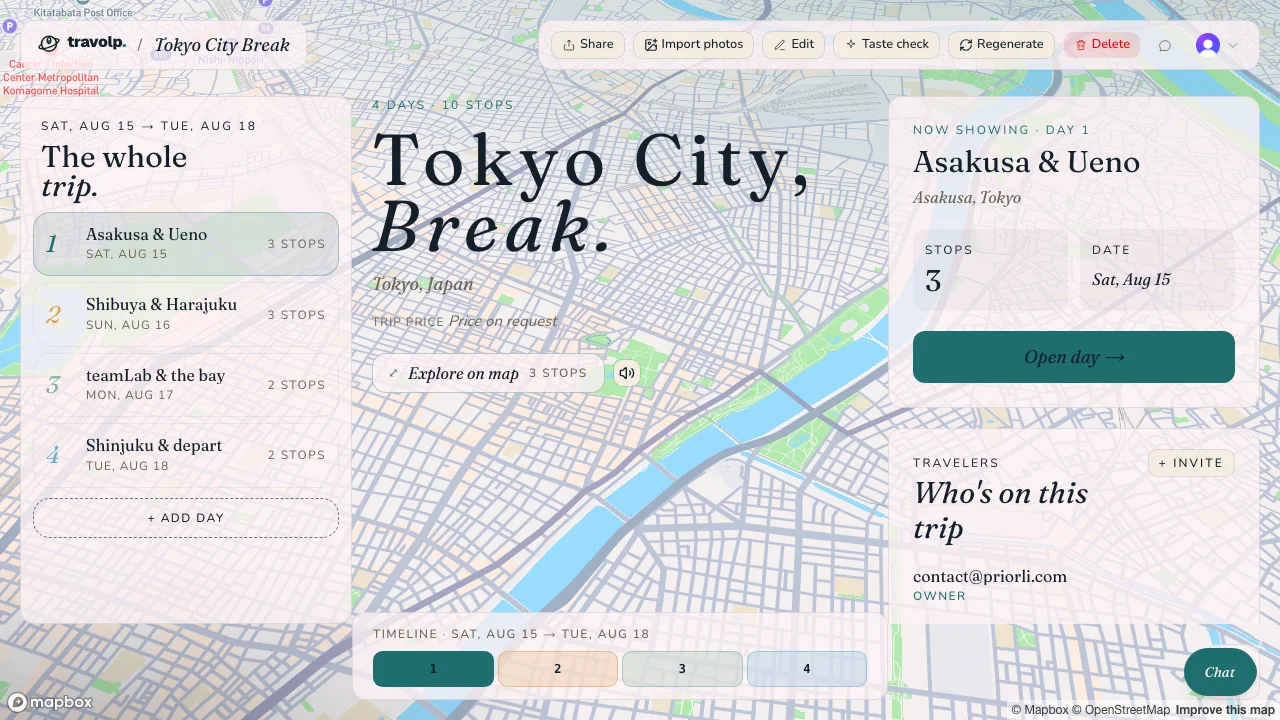
Existing product illustration, retained from the original article. It is not evidence of a new comparative test.
The practical offline boundary is saved information. In the mobile app, cache the trip before leaving and download the map areas you need. AI generation and AI chat require internet access. A saved itinerary does not become an offline AI assistant. Check the preparation steps in using your travel plans offline, then repeat them on your own phone.
Free entry also does not mean unlimited free AI. Consumer AI actions use a credit allowance, and the store lists in-app purchases. Check your available credits and the current purchase terms in the app. This article does not promise a fixed allowance or a price that has not been verified for your account.
Language settings and wrist support need precise labels
As of September 15, 2026, Travolp supports 16 regional app locales. There are regional options for US and UK English, for Brazilian and European Portuguese, and for Simplified and Traditional Chinese. The other options are Vietnamese, Japanese, Swedish, German, Finnish, French, Italian, Spanish, Danish and Dutch. Regional variants should not be counted as separate languages. An interface language also does not guarantee the quality or coverage of generated place descriptions and AI answers. Try your actual destination in the language you will use.
Apple Watch support needs similar care. Apple explains that, starting with iOS 18 and watchOS 11, an iPhone Live Activity can appear in the Smart Stack on a connected Apple Watch without a dedicated watchOS app. That glanceable view is different from a watch app you open and use directly.
We have not verified a released standalone Travolp watch app for this comparison. Do not choose it on that assumption. If wrist access affects your choice, verify the exact screen on your installed version and watch before departure. A phone screenshot or an implementation in source code cannot establish that it is available to travelers.
Run one travel day before committing the whole trip

Use a representative day from your own trip. For a family vacation, include the break you know you will need. For a group weekend, have a companion participate. The point is to expose friction while changing apps is still cheap.
- Save a short itinerary with your accommodation and one fixed booking. Check the address and date against the original confirmation.
- Invite a companion. Have them change one optional stop, then confirm that both phones show the same saved result. Our group-trip planning guide helps agree who edits what.
- Prepare offline access using the app's instructions. Turn on airplane mode, turn Wi-Fi off, reopen the app, and check the saved day and its addresses. Open the downloaded map area too. Record exactly what remains available.
- Reconnect and request a change: start an hour later while preserving the booking. Inspect the revised stops and check any AI allowance consumed.
This is a test you can run, not a set of results we are claiming. If one step fails, investigate the cause before assuming a feature is absent. A map download that did not finish and a product that offers no map download are different problems.
Choose by the correction you can live with
After that trial, the decision is more concrete. Perhaps one app leaves the booking alone but needs help spacing stops. Another makes sharing easier for your companions. A third presents the saved day more clearly with mobile data off. Decide which inconvenience you would rather handle while away.
Keep the test notes simple: the task, what you observed, any purchase required, and what you had to fix. Reuse the same day if you compare another app. That produces a decision tied to your trip instead of a feature count.
Travolp belongs on the shortlist if its planning and during-trip approach fits what you need. Wanderlog and Mindtrip belong there too. Before importing the rest of the vacation, make sure you can retrieve the first day's essential details and understand what requires a connection or more AI credits. The best time to learn those limits is at home.