How to Plan a Trip with AI: A Step-by-Step Guide (2026)
July 14, 2026 · 7 min read
Planning a trip used to mean a dozen browser tabs open at once, a spreadsheet you never finished, and a notes app crammed with links you'll never look at again. AI can now do most of that donkey work, turning a destination and a few dates into a real day-by-day plan you can actually edit and take with you. Here's how to do it properly, step by step, using Travolp as the example.
Why plan a trip with AI in the first place
Here's the honest pitch. AI is good at the dull middle part of trip planning, the bit nobody enjoys. Give it a vague idea (say, "five days in Japan in November, we like food and old temples") and it'll produce a sensible first draft: grouped by day, mapped out, paced so you're not crisscrossing the city four times over. That draft is rarely perfect, but a draft you can push back on beats a blank page every time.
What AI isn't great at is reading your mind. So the trick is to feed it enough detail up front, then steer it like you would a colleague, rather than expecting one perfect answer straight off.
Want to follow along as you read? Download the app or sign in on the web and work through each step below.
Step 1: Start with a destination and dates

Start with the two things you actually know: where and when.
- Choose your destination (one city, or several; a multi-city trip works just as well).
- Set your dates. If you've only got a rough window in mind, that's fine, you can tighten it up later.
Dates matter more than most people expect. Travolp pulls a real weather forecast for trips coming up soon (and falls back on seasonal knowledge for anything further out), and it checks for public holidays at your destination, so the plan can steer you around whatever's shut or heaving that day, and toward the festivals worth catching.
Step 2: Tell it your taste (don't skip this)
A generic itinerary is what everyone ends up moaning about. The fix is simple. Tell the AI what you actually like before it plans a single thing.
Travolp handles this with a quick taste check, a swipe deck of real places (cafés, museums, markets, viewpoints, restaurants). You swipe through, and your preferences build up a profile that carries across every trip you plan. Prefer quiet neighbourhood spots to the headline attractions? It picks up on that. Travelling with kids, or with someone who has limited mobility? Set the group's pace and mobility needs so the plan doesn't turn into a forced march.
A few inputs that make a real difference:
- Party size, adults, children, even the kids' ages.
- Pace, relaxed, balanced, or packed.
- Interests, food, history, nature, nightlife, art, whatever applies.
The more you put in here, the less editing you'll have to do later.
Step 3: Generate the day-by-day plan
Now let the AI put together the first draft. From your destination, dates, and taste profile, it builds a structured itinerary:
- Days, each with a short written briefing.
- Stops within each day, ordered geographically so you're not zigzagging back and forth.
- Legs between stops, with a suggested way to get around.
This is where AI genuinely earns its keep. Rather than you sequencing a dozen attractions across three days by hand, you get a coherent skeleton in seconds. For a worked example of what a solid first draft looks like, see our 3 days in Kyoto itinerary, or jump straight to the Kyoto plan page to watch a sample come together.
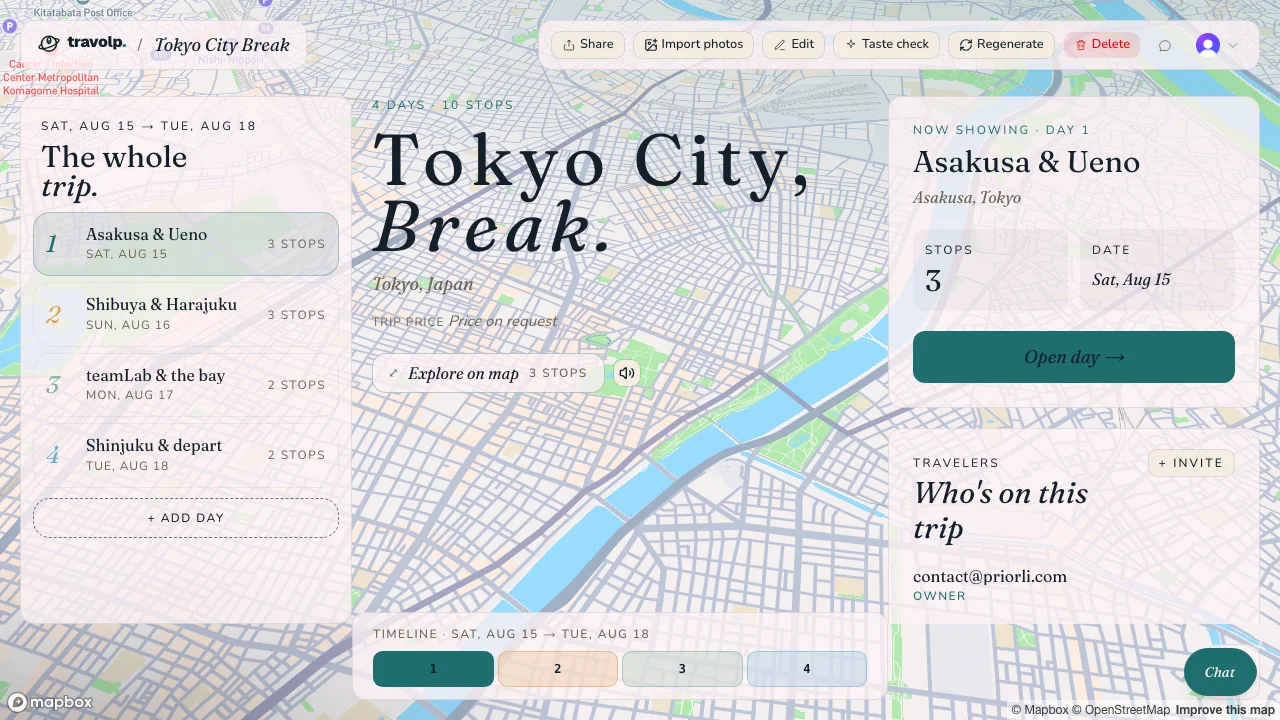
A first draft in Travolp: days down the side, every stop ordered and mapped, ready to edit by chat.
Step 4: Edit the plan by chatting with it

This is where most "AI planners" stop, and where Travolp keeps going. You don't fix the plan by dragging boxes around a calendar. You just talk to it.
Type things like:
- "Day two's too packed, move the temple to day three."
- "Add a ramen place near our hotel for the first night."
- "We're not really museum people, swap the art day for something outdoors."
- "What's the best way to get from the station to Arashiyama?"
The AI can add, remove, reorder, and re-suggest stops, add a new day, adjust your pacing, and pull live weather, public holidays, and local transport options into the conversation. It works like a well-informed mate who happens to have the whole map open. Editing by chat works on both the web and the mobile apps.
Tip: ask for changes, not perfection. "Make day three lighter" gets a better result than re-describing the whole trip.
Step 5: Import your booking confirmations
If you've already booked flights or hotels, there's no need to retype any of it. On the web, Travolp can read your booking PDFs and confirmation emails. Upload a whole stack of them (plus any text you paste in), and it pulls out the flights, hotels, dates, and locations, then anchors your plan around them. Regenerate the itinerary afterwards and those bookings stay exactly where they are.
One honest caveat: this document import lives on the web for now. The mobile apps are built around photos and on-trip use, so for the "dump all my confirmations in" step, reach for the web app instead. (You can sign in to the same account on both, sign in here.)
Step 6: Use the plan on the actual trip
A plan you can't open on the road is just homework. This is the bit that separates a planning toy from a proper travel companion.
Once your itinerary's set, the mobile app carries it with you:
- Offline access. View your trips, days, and stops with no signal at all, handy on a plane, or abroad with the roaming switched off. You can even download map regions so the map (including the 3D fly-through) works offline. Anything you edit offline queues up and syncs once you're back online. (More on this in our guide to using your travel plans offline.)
- Lens. Point your camera at a statue, a painting, or a dish you can't put a name to, and the app identifies it and reads you a short audio guide in your language, a pocket museum guide for everything that doesn't come with a plaque.
- Live re-planning. Plans change. Rain sets in, somewhere's shut, you're running late. Tell the chat and it reshuffles the day.
A realistic example, start to finish

Say you and a friend fancy five days in Kyoto in late autumn.
- You set Kyoto and your dates, then run a quick taste check, you both lean towards temples, tea houses, and quiet streets over big shopping trips.
- Travolp generates five days, routing the famous spots so each day clusters around one area. It notices your dates overlap a maple-viewing peak and leans into it.
- You chat: "We'd like one slow morning with no temples." It opens up day four.
- You upload your hotel confirmation, and the plan re-centres on that neighbourhood.
- On the trip itself, you download the Kyoto map region before leaving the hotel Wi-Fi, then use Lens at a temple to find out what you're actually looking at.
That's the whole loop. A rough idea goes in, a real trip comes out, and you've got a companion in your pocket the whole way.
The short version
- Start with a destination and dates.
- Feed it your taste (swipe deck, pace, party size).
- Generate a day-by-day draft.
- Refine it by chatting, add, move, swap, re-suggest.
- Import booking PDFs on the web so confirmations anchor the plan.
- Take it on the trip: offline maps, Lens, and re-planning on the fly.
When you're ready, download Travolp and try the whole flow on a trip you're actually taking. And if you're travelling with a group, read how to plan a group trip without the chaos next.