Best AI travel planning apps in 2026: try one day first
July 14, 2026 · 8 min read
A short break leaves little room for a bad day's planning. If your Saturday has one timed booking, lunch with friends and an early train back to the hotel, the useful question is what happens when you start an hour late. I would choose the app that makes that change easy to check, even if another produces a more impressive first itinerary.
Here we compare Travolp with Wanderlog and Mindtrip using their own published descriptions, checked on 15 September 2026 (2026-09-15). Travolp publishes this article. We have not run a hands-on comparison and this is not an independent ranking. The trial below is for you to carry out with your own trip. Check your installed version and account's purchase terms before paying, since features and offers change.
Start with the booking you cannot move

Imagine a weekend in Rome with a museum ticket already booked. Asking an app for sightseeing ideas is the easy part. The harder question is whether those ideas leave your actual booking intact when you rearrange the day. Put the fixed time into the plan first, then judge the suggestions around it.
“AI planner” and “manual planner” are poor labels for this comparison. Wanderlog has an AI assistant, while Mindtrip combines shared planning with an iOS app. Neither belongs in a category defined by staying at a desk.
Follow the jobs you need done instead. Find out how a suggestion becomes a saved stop, where confirmations go, and what your companion sees after an edit. Then check what survives without mobile data. Before spending money on a recommendation, verify the address and time against the operator's information. Our guide to checking an AI itinerary gives you a useful order for doing that.
What each company actually describes
These are product-page claims checked on 15 September 2026, not results from our own testing. An entry marked “not established here” records a gap in this comparison. It does not mean the feature is absent.
| Job | Wanderlog | Mindtrip | Travolp |
|---|---|---|---|
| Build a trip with AI | Add assistant suggestions to the trip | Chat creates an editable itinerary | Listing describes daily itineraries and replanning |
| Plan together | Real-time collaboration | Shared planning and group chat | Shared group trips |
| Keep booking material together | Reservation imports | Receipt and confirmation uploads; PDFs through Start Anywhere | Import details not assessed here |
| Carry the plan on a phone | Official page links a mobile app | iOS app advertised | Android listing verified |
| Read saved details offline | Exact scope not established here | Exact scope not established here | Offline maps advertised; cached mobile trip access explained below |
Sources are Wanderlog's AI assistant page, Mindtrip's official overview and Travolp on Google Play. A named feature is a reason to investigate, not proof that every phone behaves identically. Use the table to choose your trial tasks; it cannot establish recommendation quality or day-to-day reliability.
Keep both alternatives in the running

Wanderlog lets you add places suggested by its AI assistant to the trip itself. Its official page also describes reservation imports and real-time collaboration. If you already have bookings and friends contributing ideas, those are relevant tasks to investigate. It would be misleading to describe it as the manual option beside an AI-powered Travolp.
Mindtrip describes itinerary creation through chat, with photos and maps beside the suggestions. Its site lists group planning and chat, plus uploads for receipts and confirmations. Start Anywhere accepts screenshots or PDFs, and an iOS app is advertised. A visual planning interface does not confine a product to the laptop you used to start the trip.
Give both the same small problem: move the start later without touching your timed visit. Remove an optional stop if necessary and keep lunch unhurried. Inspect the saved result, rather than taking the assistant's reassurance as proof. If you must repair the day yourself, note how much effort that takes. This is a proposed check, not a result we have observed.
What Travolp aims to do and its practical limits
Travolp aims to help with planning and with the days you are away. Its Google Play description, checked on 15 September 2026, advertises daily itinerary generation, replanning, morning briefings and offline maps. Shared trips and Lens for identifying landmarks are also listed. These are developer descriptions of what the product offers. They do not establish that rivals stop being useful when you leave home.
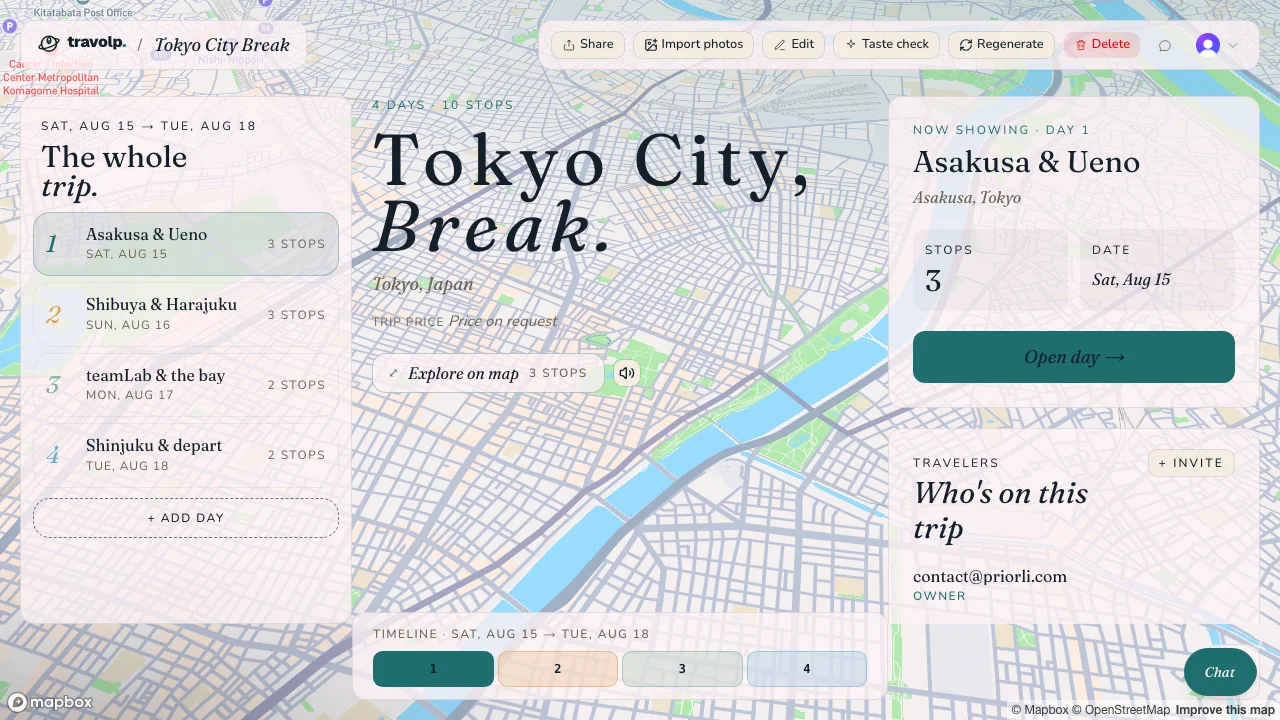
Product illustration retained from the original article, not evidence from a new comparative test.
Think of offline access as access to information you prepared earlier. Cache the trip in the mobile app while connected and download the map areas you need. AI generation and AI chat require internet access. Reading a saved day on a plane is different from asking AI to remake it there. See how to prepare travel plans for offline use, then check the actual phone you will take.
There is a separate limit to check before relying on repeated AI changes. Free entry does not mean unlimited free AI: consumer actions use a credit allowance, and Google Play lists in-app purchases. Check the credits available to your account and the current purchase terms in the app. We are not quoting an allowance or price that has not been verified for you.
Check the language and watch details
Travolp supports 16 regional app locales as of 15 September 2026. English has US and UK options; Portuguese has Brazilian and European options; Chinese has Simplified and Traditional options. The remaining choices are Vietnamese, Japanese, Swedish, German, Finnish, French, Italian, Spanish, Danish and Dutch. Those regional variants are not sixteen separate languages. Nor does a translated interface guarantee the quality or coverage of AI answers and place descriptions. Try the destination you actually intend to visit in your chosen language.
For Apple Watch, distinguish a status view from an app you open on the watch. Apple's explanation says that from iOS 18 and watchOS 11, an iPhone Live Activity can appear in the Smart Stack on a connected Apple Watch without a dedicated watchOS app.
A released standalone Travolp watch app has not been verified for this comparison. Do not make it the deciding factor on assumption alone. Check the exact screen and installed version if wrist access is essential. A screenshot on a phone, or working source code, does not prove availability to travellers.
Rehearse one day before adding the rest

Choose a day that resembles the holiday you will take. For a family break, include a proper rest. If you are travelling with friends, involve one of them in the trial. A test on your phone alone says little about how easy the shared plan will be for the group.
- Save a short day with your accommodation and a timed booking. Check its date and address against the confirmation.
- Ask a companion to change one optional stop. Confirm that both phones show the same saved plan. Our group-trip guide helps you agree who changes what.
- Prepare offline access as the app instructs. Turn on flight mode and turn Wi-Fi off. Reopen the app and inspect the saved itinerary and addresses, then open the downloaded map area. Write down what remains accessible.
- Reconnect. Ask to start an hour later while keeping the booking fixed. Inspect the actual revised stops and any AI credits used.
Nothing in that list is a claimed test result. If a step fails, find out why before deciding the product has no such feature. An unfinished map download is different from an app without map downloads. Likewise, an edit your companion cannot see might need a connection or a refresh. Establish what happened instead of guessing.
Pick the compromise you can manage away from home
The useful outcome is a short set of observations. One app might leave the booking alone but need help spacing the stops. Another might make shared decisions easier, or keep the saved day clearer when mobile data is off. Decide which correction you would rather make during the trip.
For each task, record what happened, what you changed yourself and whether it required a purchase. Use the same trial day for another app so you are comparing similar demands. Counting features will not tell you how much checking the day needs.
Travolp is worth considering if its planning and during-trip approach fits your needs. Wanderlog and Mindtrip deserve consideration too. Before moving the whole holiday into any of them, make sure you can retrieve the first day's essential details and know what needs a connection or more AI credits. Find that out before packing.